
Updated: 21 November 2026
On 20 November 2026, India's cyber security agency CERT-In published an advisory that every business owner and accounts team should read. It reported unauthorised transactions at service providers that support government-linked payments, and said payment fraud has now spread beyond banks to vendors and payout platforms.
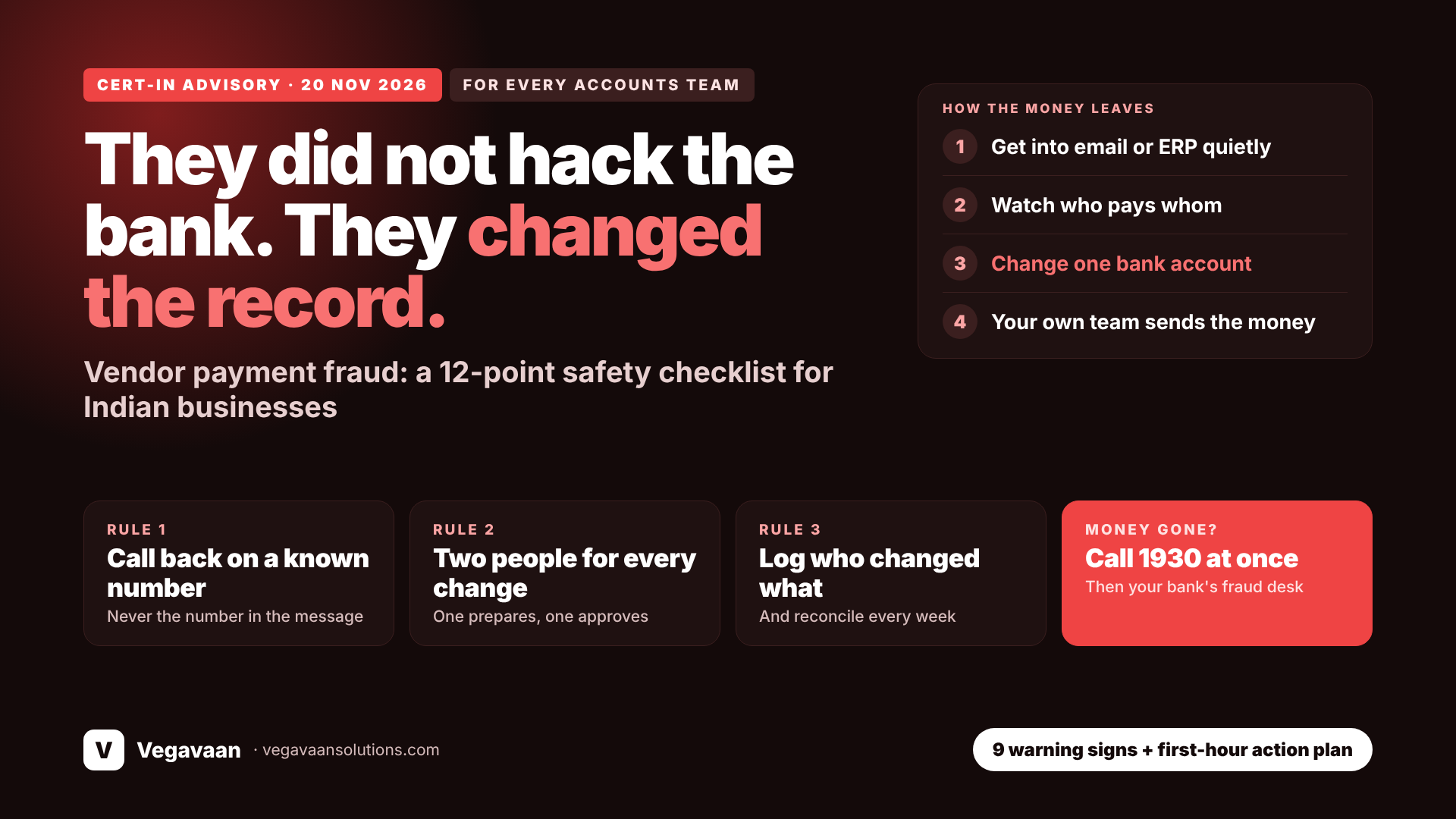
The important part is how the money was taken. The attackers did not break into a bank. They changed business records or approval relationships first, for example who gets paid and who is allowed to approve, and then let the company's own, legitimate payment process send the money. Every check passed, because the system was doing exactly what its records told it to do.
That is the same weakness behind the most common fraud against Indian small and mid-sized businesses: the "our bank account has changed" email. This guide explains the advisory in plain language, shows how the fraud works in a normal company, and gives a 12-point checklist you can put in place this week.
Contents
- Quick answer
- What the CERT-In advisory says
- How the fraud works: change the record, not the bank
- Real cases from Indian companies
- 5 forms this fraud takes in a small business
- 9 warning signs for your accounts team
- 12-point payment safety checklist
- What to fix in your software
- Money already sent? Do this in the first hour
- Frequently asked questions
Quick answer
CERT-In's advisory of 20 November 2026 warns that attackers are altering business records or approval relationships and then using legitimate payment processes to move money, and that this has spread from banks to vendors and payout platforms. For an ordinary business, the same pattern appears as changed vendor bank details, fake messages from the owner, or a hacked email or ERP login. The defence is simple and mostly free: never change bank details on the strength of an email or WhatsApp message, confirm every change by calling a number you already have, require two people for new beneficiaries and large payments, keep a log of every change to vendor records, and reconcile payments against your original records. If money has gone, call 1930 and your bank immediately.
What the CERT-In advisory says
| Point | What was reported |
|---|---|
| What happened | Unauthorised transactions at technology service providers supporting government-linked payments, and at platforms handling vendor payouts |
| Who is affected | No longer only banks: vendors, partners and payout platforms |
| Method | Business records or approval relationships were altered, then legitimate payment processes were used to approve the transactions |
| Where the gap was | Misuse of business applications and workflows, and weak verification and reconciliation of changes to business records, not only direct attacks on payment systems |
| Role of AI | Automated scanning for exposed systems, faster exploitation of known weaknesses, many automated tasks running in parallel, and use of valid logins and normal admin functions |
| Amount lost | Not disclosed |
CERT-In's recommendations, as reported, are aimed at government bodies, banks, service providers and fintechs: restrict the accounts and integrations that can approve payments or change payment records, require independent confirmation for high-risk changes, reconcile important business data against authoritative records, limit administrator privileges, and monitor changes to payment-related records.
Read that list again. Not one item is about buying an expensive security product. Every one is about who can change a record, who checks the change, and who notices. That applies equally to a 20-person company paying suppliers from a current account.
How the fraud works: change the record, not the bank
Banks have become hard to break into. So attackers moved one step earlier, to the place where your company decides whom to pay.
- Get in quietly. A stolen email password, a look-alike email address, a weak ERP login, or simply a convincing message.
- Watch. Learn who your suppliers are, when payments are due, and who approves them.
- Change one record. A vendor's bank account number, a beneficiary in net banking, an approver in the workflow, a payout list.
- Wait for the normal payment run. Your own staff, following your own process, send the money.
- Move the money fast through several accounts before anyone notices.
Nothing looks like a "hack". The invoice is real, the amount is right, the approval is genuine. Only the destination is wrong, and you usually find out weeks later when the real supplier asks why they have not been paid.
Real cases from Indian companies
| When | Who | Loss | What happened (as reported) |
|---|---|---|---|
| Feb 2025 | Infrastructure company, Hyderabad | ₹5.47 crore | Fraudsters impersonated a Dutch supplier using an email address that differed by a single letter and redirected payments to their own account. Discovered when the real supplier asked about pending payments |
| Jul 2025 | Engineering firm, Pune | Over ₹2.3 crore | Emails with an Italian supplier were intercepted and the bank details altered |
| Mar 2026 | Company in Hyderabad | ₹1.2 crore | A fraudster posed as the owner on WhatsApp and an accountant transferred the funds |
| Nov 2026 | Digital payments company, Pune | ₹8.33 crore | A registered merchant ID was allegedly misused to route funds into 10 bank accounts, according to police |
These were established companies with finance teams. The common thread is not carelessness; it is that a change was accepted without being confirmed through a second, independent channel.
5 forms this fraud takes in a small business
| Form | What you see | What was really changed |
|---|---|---|
| Changed vendor bank details | "Due to audit, please use our new account from this invoice" | The vendor's account in your records |
| Fake owner or director | WhatsApp from a new number with the owner's photo: "In a meeting, pay this urgently" | The approval relationship: someone pretends to be the approver |
| Hacked email account | A genuine-looking reply inside an existing email thread | The invoice PDF or the account number in it |
| Insider or shared login | Nothing, until reconciliation | Beneficiary or salary account edited in ERP, Tally or net banking |
| Payout or refund list tampering | A bulk upload file that looks normal | A few rows in the Excel or CSV file |
9 warning signs for your accounts team
- A request to change bank details that arrives by email or WhatsApp only
- Urgency or secrecy: "today itself", "do not call, I am in a meeting"
- An email address that is almost right: an extra letter, .co instead of .com, a Gmail address for a company
- The new account is in a different name, city or bank from before, or a personal account for a company
- An overseas supplier suddenly asking for payment to a third country
- A new phone number for a known person
- The contact avoids a voice or video call
- An invoice with slightly different fonts, logo or format
- A new beneficiary added outside working hours or by someone who does not normally do it
One sign is a reason to check. Two together are a reason to stop the payment until a senior person confirms.
12-point payment safety checklist
Rules that cost nothing
- The call-back rule. No bank detail is added or changed until someone calls the vendor on a number already in your records, never the number in the new message.
- Two people for risky actions. One person prepares; another approves new beneficiaries, changes to bank details, and payments above a limit you choose.
- A written rule for "urgent from the boss". The owner agrees, in advance and in writing, that no payment instruction on WhatsApp or from a new number is valid without a voice call.
- A cooling-off period. No large payment to a beneficiary added in the last 24 to 48 hours.
- A small test payment to any new or changed account, confirmed by phone before the full amount.
- A change register. A simple log of every change to vendor bank details: who asked, who verified, by which call, who approved.
Settings to switch on
- Two-step login on email for everyone in accounts, purchase and management. Most of these frauds begin with one stolen email password.
- Maker-checker in net banking. Most business accounts support it; ask your bank to enable it, along with SMS and email alerts for every new beneficiary.
- Separate logins, no sharing. One user ID per person in ERP, Tally and banking, with only the rights each person needs.
- Check email forwarding rules. Attackers often add a hidden rule that forwards or hides mail. Review rules on finance mailboxes.
Habits that catch what gets through
- Reconcile weekly, not at year end. Match payments made against purchase orders and the vendor master. Ask key vendors to confirm receipt.
- Train with real examples. Fifteen minutes with the accounts team on the cases above does more than any poster.
What to fix in your software
CERT-In specifically pointed to weak verification and reconciliation of changes to business records. In practice, that means your ERP, billing or custom software should do the following.
| Control | What it should do |
|---|---|
| Role-based access | Only named users can add or edit vendor bank details; nobody can both edit and approve |
| Approval workflow | Any change to bank details stays "pending" until a second user approves it |
| Audit trail | Every change records who, when, old value and new value, and cannot be deleted |
| Alerts | Email or WhatsApp alert to the owner when a bank account is added or changed |
| Payment hold | Automatic hold on payments to recently changed accounts |
| Bulk file protection | Payout files generated by the system, not edited by hand in Excel before upload |
| Reconciliation report | Payments made compared with the approved vendor master, with mismatches highlighted |
| Login security | Two-step login for finance and admin users; admin rights reviewed every quarter |
If your software cannot answer the question "who changed this vendor's account number, and when?", that is the first gap to close.
Money already sent? Do this in the first hour
- Call 1930, the national cyber crime helpline, and give the transaction details. Speed matters because funds can sometimes be frozen before they are withdrawn.
- Call your bank's fraud desk and send a written request to recall the payment and alert the receiving bank.
- File a complaint at cybercrime.gov.in and keep the acknowledgement number.
- Preserve evidence. Do not delete emails, messages or files. Take screenshots with dates and full email headers.
- Change passwords on the email and software accounts involved, and sign out other sessions.
- Tell the real vendor and check whether other payments or customers are affected.
For wider protection, see our guide to cybersecurity in 2026.
How Vegavaan can help
Vegavaan Info Solutions helps businesses close exactly the gaps this advisory describes. We review how payments are created, changed and approved across your email, ERP, billing software and banking; add approval workflows, audit trails and change alerts to custom software; set up two-step login and access rights; and build reconciliation reports that flag a changed account before the money leaves. Our cyber security and IT consulting teams work with your accountant, not around them.
Get a payment process safety review
Tell us which accounting software and bank you use, and we will show you where a record could be changed without anyone noticing.
Frequently asked questions
What did CERT-In warn about in November 2026?
Unauthorised transactions at service providers supporting government-linked payments and at vendor payout platforms, where attackers altered business records or approval relationships and then used legitimate payment processes.
What is vendor payment fraud?
A fraud in which a criminal gets a business to pay a genuine invoice into the criminal's bank account, usually by impersonating the vendor or changing the vendor's bank details in the company's records.
How do fraudsters change vendor bank details?
Through look-alike email addresses, hacked email accounts, edited invoice PDFs, fake WhatsApp messages from an owner, or direct changes in ERP or net banking using stolen or shared logins.
What is the single most effective protection?
The call-back rule: confirm every new or changed bank account by calling a phone number you already had on file, before any payment.
Is this only a risk for large companies?
No. Small and mid-sized businesses are frequent targets because one person often handles both vendor records and payments.
What should I do if a payment went to a fraudster?
Call 1930 and your bank immediately, file a complaint at cybercrime.gov.in, preserve all emails and messages, and change the passwords on affected accounts.
How is AI changing these attacks?
According to CERT-In, attackers use AI to scan for exposed systems, exploit known weaknesses faster and run many tasks in parallel. For a small business the visible effect is more convincing emails and messages, which is why process checks matter more than spotting bad grammar.
Does my accounting software need to change?
It should restrict who can edit bank details, require a second approval, keep a permanent log of changes, and alert you when an account is added or changed. If it cannot, ask your developer or vendor.
Conclusion
The lesson of this advisory is uncomfortable but useful: the money was not stolen by defeating security, it was sent by trusted systems following altered records. The same is true of almost every "changed bank account" fraud against Indian businesses. You do not need a large budget to stop it. You need one rule that is never broken (call back on a known number), two people on every risky change, and a record of who changed what. Put those in place this week.
Want your payment process checked? Talk to Vegavaan.
This article is general information, not legal advice. Sources: Reuters: India cyber agency reports unauthorised transactions at payment firms (20 Nov 2026); Inc42: report on the CERT-In advisory and its recommendations; The420: Pune police warning after an ₹8.33 crore fraud; Siasat: Hyderabad firm loses ₹5.47 crore.