
Updated: October 2026
In most Indian clinics, the day still runs on paper: handwritten prescriptions, a register at the reception, and a pile of old slips that nobody can find when a patient returns after six months. It works, until a patient forgets what medicine they were given, a follow-up is missed, or a pharmacist cannot read the handwriting.
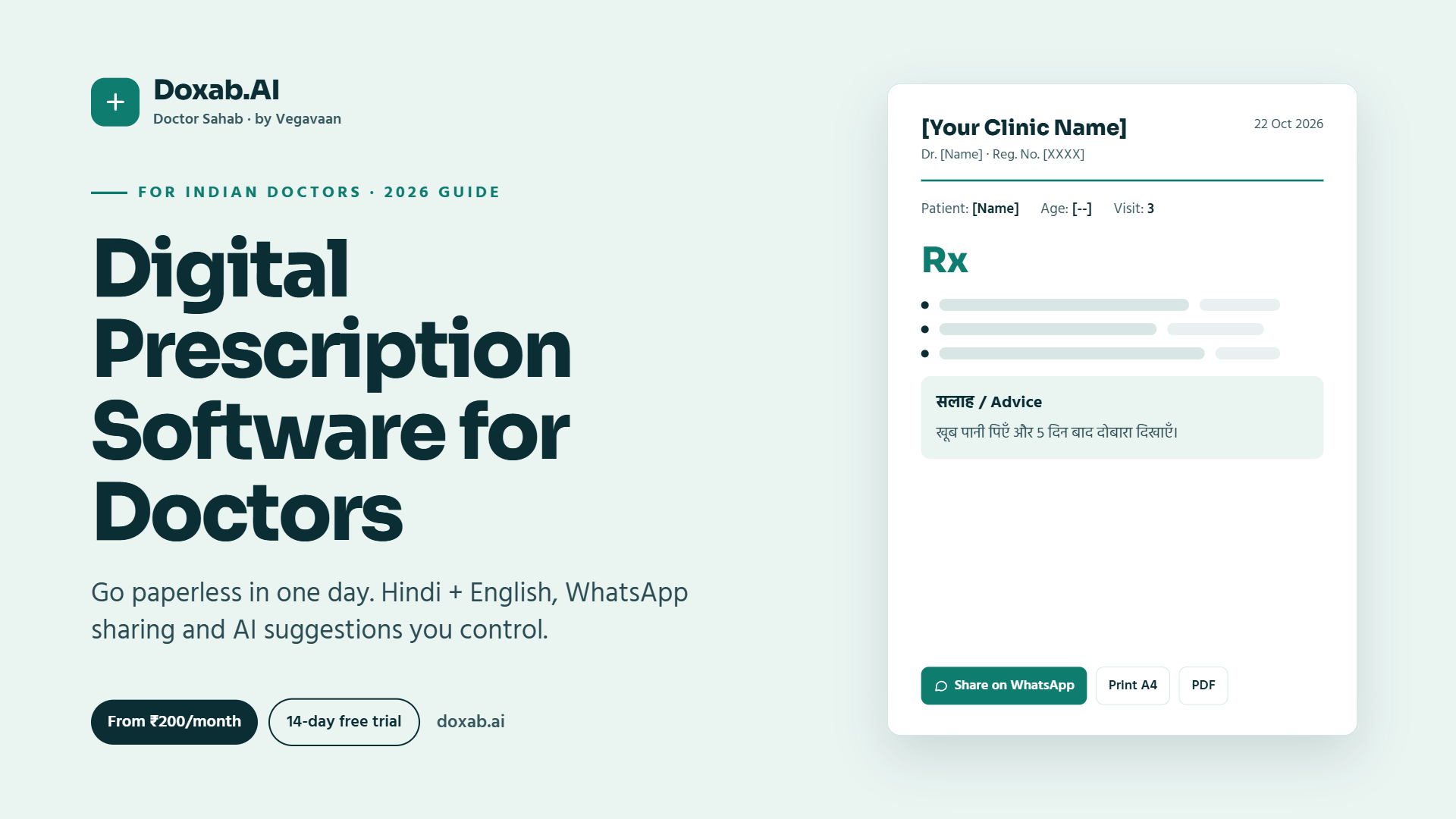
Digital prescription software fixes this without changing how you practise. You still examine, diagnose and decide. The software simply remembers every patient, every visit and every prescription, prints a clean A4 prescription with your clinic's name, and sends it to the patient on WhatsApp.
This guide explains what to look for in clinic and prescription software in India, what it costs, how to go paperless in a single day, how AI can help safely, and how Doxab.AI (Doctor Sahab), built for Indian doctors, fits in.
Contents
- Quick answer
- Paper vs digital prescriptions
- 12 features to look for
- What clinic software costs in India
- How to go paperless in one day
- How AI should help with prescriptions (safely)
- Patient data privacy and the DPDP Act
- Meet Doxab.AI (Doctor Sahab)
- Frequently asked questions
Quick answer
Digital prescription software lets Indian doctors register patients, record every visit, write and print prescriptions, share them on WhatsApp and track follow-ups from a phone, tablet or computer. Good options work in both Hindi and English, need no training, keep patient data private and cost a few hundred rupees a month. Doxab.AI (Doctor Sahab), for example, starts at ₹100 per month with a 14-day free trial.
Paper vs digital prescriptions
| Paper prescriptions | Digital prescription software | |
|---|---|---|
| Finding an old patient | Search through registers and files | Search by mobile number, name or patient ID in seconds |
| Visit history | Depends on the patient bringing old slips | Every visit saved separately and always available |
| Repeat prescription | Write everything again | Repeat the previous prescription with one tap and edit |
| Readability | Handwriting can be misread | Clear printed A4 prescription with your clinic name |
| Sharing | Patient must keep the paper | PDF on WhatsApp, plus a patient app |
| Follow-ups | Easy to forget | Lists of today's, upcoming and missed follow-ups |
12 features to look for in clinic and prescription software
- Fast patient search by mobile number, name or ID, with a warning before creating a duplicate patient.
- Visit-wise treatment history, so every consultation is saved separately.
- Printable A4 prescriptions with your clinic name and details, plus PDF download.
- WhatsApp sharing, because that is how Indian patients actually keep documents.
- Follow-up tracking for today's, upcoming and missed visits.
- Hindi and English for the interface, advice and voice typing, so you can write the way you talk.
- Voice typing and voice notes to save time between patients.
- Works on the phone you already have, without IT setup or expensive hardware.
- A patient app or login, so patients can see the prescriptions you share with them.
- Privacy and access control: only your clinic should see your patients.
- No lock-in: your records stay viewable and exportable even if you stop paying.
- AI assistance with the doctor in control: suggestions you review and confirm, never automatic prescriptions.
What clinic software costs in India
Clinic and prescription software in India ranges from free basic apps to large hospital systems costing lakhs. For a single-doctor or small clinic, a monthly subscription of a few hundred rupees is usually enough. When comparing, check:
- Is GST included in the price?
- Is there a free trial before you pay?
- Are AI features included or charged extra?
- What happens to your data if you stop the subscription?
- Do you need to buy any hardware?
How to go paperless in one day
- Morning: sign up for a free trial, add your clinic name and details, and check how the printed prescription looks.
- First patients: register each new patient with their mobile number as they arrive. There is no need to enter old records first.
- During consultations: write prescriptions using typing or Hindi/English voice typing, then print or share on WhatsApp.
- Evening: look at the follow-up list and see who needs to come back.
- Next weeks: returning patients are added naturally as they visit. Within a month, most of your regular patients are digital.
How AI should help with prescriptions (safely)
AI can save time, but in medicine the rules must be clear. Good clinical AI should:
- Suggest, not decide. The doctor makes every diagnosis and prescribing decision.
- Need confirmation before anything is added to a prescription.
- Add safety checks, such as allergy and drug-interaction warnings, and red flags to watch for.
- Protect identity by not sending patient names, mobile numbers or addresses to the AI.
- Save effort by suggesting dose, duration, tests and patient advice for a diagnosis you have chosen, which you can edit.
Patient data privacy and the DPDP Act
Patient records are among the most sensitive personal data a business can hold. Under India's Digital Personal Data Protection (DPDP) Act, core obligations such as security safeguards, breach reporting and patient rights apply from 13 May 2027. Choosing software with access controls, secure storage and data export makes these obligations much easier to meet than paper files or loose spreadsheets. Read our DPDP compliance checklist to learn more.
Meet Doxab.AI (Doctor Sahab)
Doxab.AI, also known as Doctor Sahab, is smart clinic software with AI, built for Indian doctors by Vegavaan Info Solutions. Its promise is simple: "Your clinic, organised. Your prescriptions, AI-assisted."
What Doxab does
- Find any patient in about 2 seconds by mobile number, name or patient ID
- Repeat a prescription with 1 tap, then edit
- Visit-wise digital treatment history
- A4 prescriptions with your clinic name, PDF download and printing
- Share prescriptions on WhatsApp
- Follow-up tracking for today, upcoming and missed visits
- Hindi and English, including voice typing and patient advice
- Installable doctor and patient apps that run in the browser on any Android phone, tablet or computer
- Only your clinic can see your patients
- No training needed
AI Power: suggestions, with you in control
For a diagnosis you choose, Doxab's AI suggests medicines with dose and duration, tests, red flags and patient advice, and runs allergy and interaction checks. You confirm each item before it is added. The AI does not receive the patient's name, mobile number, address or patient ID.
Doxab pricing (GST included)
| Plan | Monthly | 6 months | Yearly | Includes |
|---|---|---|---|---|
| Standard | ₹100 | ₹500 | ₹1,000 | All clinic features + 5 free AI tries per month |
| AI Power | ₹500 | ₹2,700 | ₹5,000 | AI suggestions on every visit + priority support |
Every plan starts with a 14-day free trial. If a subscription lapses, your records are not deleted; they stay viewable and exportable.
👉 Start your free Doxab trial · See all features · View pricing
Frequently asked questions
Is there prescription software in Hindi for Indian doctors?
Yes. Doxab.AI (Doctor Sahab) supports Hindi and English for the interface, patient advice and voice typing, so doctors can write prescriptions in the language they and their patients prefer.
How much does clinic management software cost in India?
For small clinics, subscriptions usually cost a few hundred rupees a month. Doxab's Standard plan costs ₹100 per month or ₹1,000 per year, and the AI Power plan costs ₹500 per month or ₹5,000 per year, with GST included and a 14-day free trial.
Can I share prescriptions with patients on WhatsApp?
Yes. Digital prescription software like Doxab lets you download a prescription as a PDF and share it on WhatsApp, and patients can also see prescriptions you share in the patient app.
Does AI write the prescription for the doctor?
No. In Doxab, AI only suggests medicines, doses, tests, red flags and advice for a diagnosis the doctor has chosen. The doctor reviews and confirms every item and makes every clinical decision.
Do I need a computer to use digital prescription software?
Not necessarily. Doxab runs in the browser on any Android phone or tablet and can be installed like an app. A computer and printer also work if you prefer printing prescriptions.
What happens to my patient data if I stop my subscription?
With Doxab, records are not deleted when a subscription lapses. They remain viewable and exportable.
Conclusion
Going digital does not mean changing how you treat patients. It means never losing a record, never misreading a prescription and never forgetting a follow-up. Start small: try it for a day with new patients, and let the system grow with your practice.
Ready to organise your clinic? Try Doxab.AI (Doctor Sahab) free for 14 days, or call +91 73008 62597.
Doxab's AI suggestions support the doctor's judgement and do not replace it. All diagnosis and prescription decisions are made by the treating doctor. See the Doxab website for the full medical disclaimer.